 HP Quick Start Bot Shots
Grok Bot playbook dashboard
Skimmable tracks from BotShots' field-tested playbook
Drawn from 100+ Grok Bot training videos and changelog tips (reviewed late Oct–early Nov 2026). Adapted here for Bot Shots members building a side hustle with a narrow bot team — not charity ops jargon, just the habits that work.
Learning tracks
Pick one track. Do a little every day. Have a shot, learn, go again.
Build a narrow bot team
Brain dump your goals, keep each bot to one job, give goals not chores, and connect the tools each role needs.
Open starter 10 →Teach, then automate
Watch and correct, save as a skill, teach by demonstration, write skills like recipes — only then schedule a routine.
Open intelligence cards →Morning approvals, overnight work
Twice-daily briefs, meeting notes routed to bots, and a clear stop rule so nothing loops for half an hour.
Open workflows →Approve what leaves or spends
Keep human approval for money and outbound messages. Share one computer carefully. Check retention settings.
Open guardrails →Drop-shipping with bots
Map Guide #1's bot org chart onto playbook habits: research, listings, customer replies (drafts only), and a weekly metrics loop.
Open dropship track →More niche guides
Placeholder: as BotShots ships Guide #2+, each niche gets its own how-to track here. Members get 25% off.
Membership benefits →Start with these 10
BotShots' recommended first pass through the full playbook. Do these before you build a big bot army.
Brain dump, then reverse prompt
Tell your lead bot everything about your goals and work, then ask which bots and routines it would set up — and have it create them.
Keep every bot narrow
One job, short description. Three lines: what it owns, what it never does without asking, where it reports.
Give each bot a goal, not a chore
Build around an outcome ("secure first 10 sales"), not busywork ("organise my email").
Give the bot every tool it needs
Connect Drive, calendar, store admin, email — whatever a human in that role would use.
Watch, correct, then save as a skill
Do the task together, fix it, turn the result into a skill. Automate only when it works in one shot.
Email triage with a legitimacy check
Daily routine ranks real opportunities, drafts replies, and flags scams — you send nothing without reading.
Twice-daily intel brief
Morning and late-afternoon: what changed, what needs follow-up, what to know before the next school run or shift.
Meeting notes become routed tasks
After a call, the bot sweeps notes, hands each action to the right bot, and queues what you promised.
Morning approvals, overnight work
Start the day approving drafts. End it by asking what the bots can work on overnight.
Approve what leaves or spends
Money and outbound messages need you. Too many approvals and you'll rubber-stamp — keep the list short.
Maximising intelligence
Core habits from the playbook's first section. Skim the cards; pick two to practise this week.
Brain dump → reverse prompt
Dump goals first; let the bot propose the team.
Keep every bot narrow
Bloated descriptions make bots slower and duller.
Watch, correct, save as skill
Skill before routine. Always.
Teach by demonstration
Record a browser task slowly; stop before submit/pay/send.
Write skills like recipes
When to use · exact order · what if it goes wrong.
Global vs bot memory
Shared facts about you go global; niche contacts stay on one bot.
Let the bot interview you
Relentless questions until you share the same picture of the plan.
Give long tasks a stop rule
"If stuck after 10 minutes, stop and tell me."
Show the style you want
Reference examples beat generic prompts.
Tiered alert rules
Ping now vs daily roundup. Silence when nothing changed.
Goals, not chores
Theme + clear outcome for every bot.
Every tool the job needs
No tools = struggling bot.
Daily workflows
Use-case cards from the playbook — the ones that fit a side hustle and a full life.
Email triage
Rank opportunities, draft replies, archive spam. You send.
Group chat review panel
Several role bots debate a proposal; keep groups small.
Bots get their own email
Assistant-style names, limited permissions — never your main login.
Twice-daily intel brief
One brief beats ten separate pings.
Pre-call brief / post-call recap
One-pager before; draft follow-up after. You approve.
Meeting notes → routed tasks
Actions handed to the right bot automatically.
Morning approvals / overnight work
Your rhythm for a job + family day.
Dates from email & paper photos
Deadlines into the calendar with a day-before reminder.
Keep relationships warm
Daily suggestion of who to nudge — drafts only.
Watch, don't just link
Ask for a rundown of long videos or webinars.
Invoice follow-up drafts
Polite reminders queued for your OK.
Metrics bot closes the loop
Weakest listings or pages flagged on a daily cycle.
Guardrails & approvals
The playbook's non-negotiables. Print these next to your desk if you like.
Usage & noise under control
Notifications for main bots only; slow chatty routines.
Read a template before you add it
Import switched off. Pilot one small job for a week.
Set one main bot
So two bots don't both triage your day.
Check data retention
Review what the provider may keep about your private data.
Bots share one computer
You sign in on the bot's screen. Don't paste passwords into chat.
Approve what leaves or spends
Short approval list. Log the rest.
Ask before runs that need login
Routines ping you when 2FA would otherwise stall them.
Stop rule on long tasks
Stuck bots report back instead of burning half an hour.
Drop-shipping bot track
How Guide #1 maps onto the playbook. Part real (org chart + guide steps), part suggested first-version mapping — refine as members feedback comes in.
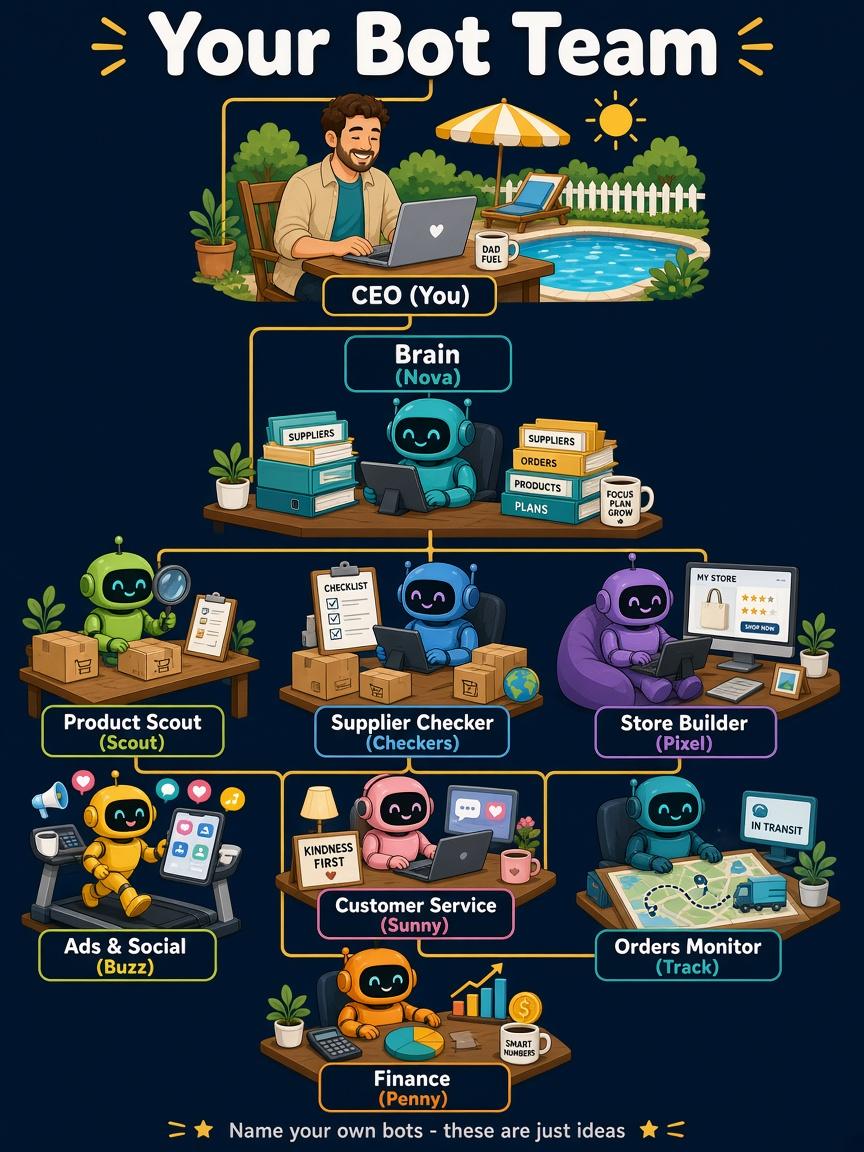
Chief of Staff / lead bot
Brain dump (step 1), morning approvals (32), twice-daily brief (25).
Research / product scout
Narrow brief (2), stop rule (9), metrics loop on weak products (42).
Listings & copy bot
Show style examples (11), skill-before-routine (3), drafts only.
Customer reply bot
Email triage (21), legitimacy check, you hit send.
Ops / supplier tracker
Dates from emails (33), register with due-date reminders (40).
Break-even guardrail
Approve what spends (56). Clear stop rule if the maths fails — from Guide #1.
About this dashboard
Source: BotShots Grok Bot Training Playbook (box copy yt/playbook.md, ~65+ numbered steps across intelligence, use cases, initiatives and field tips through 5 Nov 2026). Member-facing copy generalises the original TAA-oriented owner notes into side-hustle language. Full step-by-step source citations stay in the master playbook; this page is the skimmable learning hub. Track 06 and some dropship mappings are first-version placeholders.